

Introduction to ERP Software
Enterprise Resource Planning (ERP) software is a unified business management platform that integrates essential functions like finance, human resources, supply chain, and customer relationships into a single, connected system. This integration replaces isolated departmental systems, creating one reliable source of truth for all business data. The primary purpose of an ERP system is to streamline operations, automate processes, and provide real-time visibility across an entire organization. By connecting disparate business functions, ERP software enables better decision-making, improves efficiency, and supports business growth.
Modules of an ERP System
An ERP System has several specialized modules, each responsible for supporting a specific business function, while interrelating with all other modules. This relationship is what truly makes an ERP System powerful, as opposed to other systems that operate individually.
Finance and Accounting.
This module is the financial center of the organization. It automates the functions of accounts payable and receivable, manages the general ledger, budget and forecasting, and tax compliance, while being able to produce important financial reports in real time, such as balance sheets and profit/loss statement. It also manages and tracks all financial transactions of the organization, providing a clear perspective of the financial status of the organization at any specific time and pinpointing when a financial decision needs to be made to improve the financial status of the organization.

HR and Payroll
The HR module consolidates all employee-related information and processes, including employee record management, recruitment, onboarding, performance reviews, and benefits administration. Payroll features automate the calculations and tax withholdings, as well as salary payments, and process payments in an accurate and compliant manner with the employment and labor laws.

Supply Chain and Inventory Management
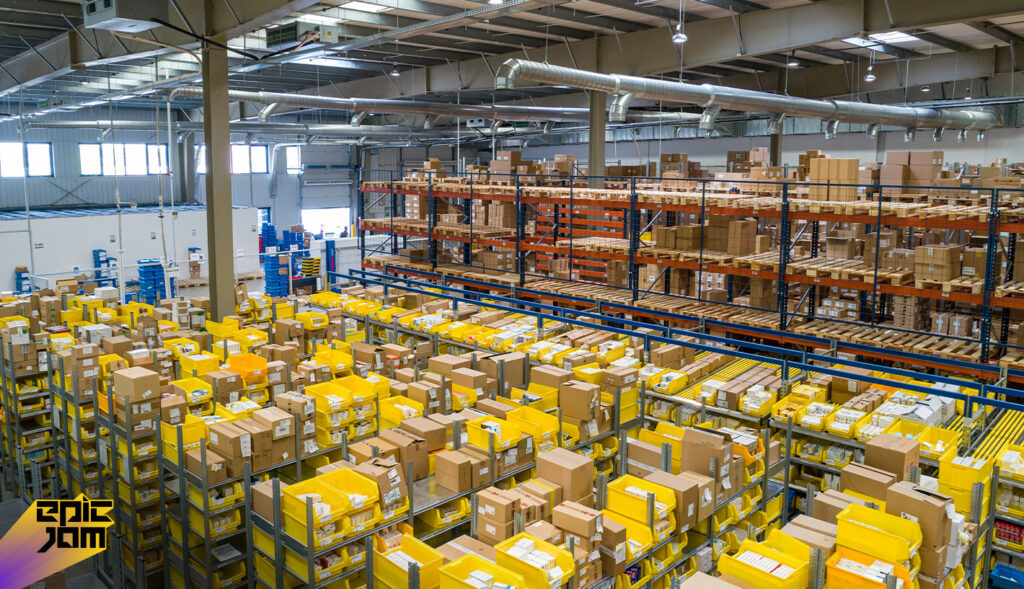
This module manages the movement of goods in the supply chain, monitoring inventory in real time, managing purchase orders, and communicating with suppliers. The module also encourages the optimization of stock and logistics to avert shortages, minimize excess spending on inventory, and enhance the efficiency of order fulfillment. Epic Jam is an example of an ERP business with a focused application in supply chain optimization.
Manufacturing and Production
For product-based businesses, this module plans and controls the manufacturing process. It schedules production, manages bills of materials, tracks work orders, and monitors quality. This helps optimize the use of machinery, labor and raw materials to reduce waste, and ensures production is on time.
Business Intelligence (BI) and Reporting
This module collects data from all other components of the ERP system to provide actionable business insights. It offers customizable dashboards and advanced analytics to help spot trends, forecast future outcomes, and make data-driven decisions.
Customer Relationship Management (CRM)
This module manages contact with customers, and prospective customers, and retains information on the entire sales process, customer service communications, and marketing automation. With the pooled customer information, it allows the sales, marketing, and customer support groups to enhance their interactions with the customer.

Primary Benefits of Implementing an ERP System
Business Benefits of Adopting an ERP System are substantial and provide immediate positive impact on a company’s operational efficiency and responsiveness.
Increased Operational Efficiency
Business process automation is a core benefit of the system, a highly advanced ERP software does the heavy lifting on mundane, repetitive and time-consuming tasks like data entry, invoicing, and order processing. It enables employees to focus on other high-value tasks and reduces time significantly.
Improved Data Accuracy and Visibility
Business data is stored and processed in a single system, removing data silos. This gives each department up-to-date data on the company’s status. Executives can view an up-to-date summary of the company from each department, be it finance, sales or inventory.
Improved Collaboration: By removing data silos, departments can better collaborate. For example, the sales team can view real-time inventory and confirm delivery dates, while procurement can determine the required materials for the production schedule.
More Strategic Decisions: Having real-time access to reports and analytics enables managers to make more timely and informed decisions, and more strategic.
Designed for Growth: Modern ERP systems are designed to expand easily. They add new users, incorporate more business units, and add operational complexity. Companies can scale seamlessly, and without the need for a new system.
Key Deployment Models: Cloud vs. On-Premise
Organizations can select how to host and access their ERP software. There are two principal models:
Cloud ERP (SaaS)
How it functions: The software is stored on the vendor’s servers and can be accessed via a web browser. The company pays a subscription fee for a known amount.
Pros: There are lower initial expenses, automatic updates, and maintenance is taken care of by the vendor. Users can scale quickly without being on-site.
Cons: They have less command of the servers and upgrade timelines.
On-Premise ERP
Description: On-Premise ERP is an enterprise resource program where the company installs the software on its on-premise (in-house) servers and computers and the company’s internal IT department manages the programs.
Advantages: The company has complete autonomy and management of its data, security, systems and upgrade cycles. The program can also be tailored and customized.
Disadvantages: The program requires high initial capital expenditure (at least in the hardware and licenses) and requires a fulltime IT department. Also, the program has unique hardware constraints that can limit overall scalability, often translating in higher marginal costs.
| Module | Core Function | Key Benefit to Your Business |
| Finance & Accounting | Automates AP/AR, manages general ledger, financial reporting, and tax compliance. | Delivers real-time financial health and ensures accurate, audit-ready books. |
| Inventory & Supply Chain | Tracks stock levels, manages purchase orders, and optimizes logistics and supplier relationships. | Prevents stockouts and overstocking, reducing costs and improving delivery times. |
| Sales & CRM | Manages the customer lifecycle, sales pipeline, orders, and marketing campaigns. | Strengthens customer relationships and boosts sales efficiency with integrated data. |
| Human Capital Management | Handles payroll, benefits, recruitment, onboarding, and performance management. | Streamlines workforce management and improves employee experience. |
| Procurement | Automates purchasing workflows, manages vendor contracts, and tracks spending. | Ensures cost-effective buying and reduces manual purchase order processing. |
| Production/Manufacturing | Schedules production, tracks materials, and monitors quality control and machine efficiency. | Optimizes manufacturing processes, reduces waste, and ensures on-time production. |
| Business Intelligence | Gathers data from all modules to provide dashboards, reports, and predictive analytics. | Empowers data-driven decision-making by uncovering trends and insights. |
Implementation Considerations and Best Practices
The installation is an ERP system and requires precise planning and management in advance of the scheduled deployment period.
Articulate Precise Corporate Objectives: Begin by evaluating the operational objectives of the firm and the pain points being targeted with the new program. This operational focus will be the foundation for the entire deployment.
Obtain Executive Sponsorship: It is essential for an executive in the company to provide support to assist in consolidating the company’s resources, managing constraints, and fostering organizational assimilation of the system deployment.
Organize Data Migration: Data is often the most critical component, and often the most time-consuming, of the entire deployment. It requires the cleaning, templating, and transfer of data from the legacy systems to the new ERP.
User Training and Change Management: The use of the new system should be integrated with its corresponding operational change to the legacy system. Coordinated education, cross-training, and precise documentation will streamline both system deployment and organizational assimilation.
Think about installing your ERP in Phases: Instead of deploying all modules to all locations at once, consider a phased approach implementation (e.g., modules or one business unit at a time). This approach minimizes risk, while allowing for incremental learning and adaptation.
Conclusions
An ERP is more than just another IT implementation; it is an organizational strategic asset that unifies and streamlines core business processes. A single source of truth drives efficiencies, visibility, and cross functional collaboration, enhancing the organization’s ability to grow sustainably.
Read Also: Beginners Guide to Web Application Development (2025)
FAQs
Q1. What is ERP software used for?
ERP (Enterprise Resource Planning) software is used to manage and integrate core business processes such as finance, human resources, inventory, sales, and operations in one centralized system. It helps businesses improve efficiency, reduce manual work, and make better data-driven decisions.
Q2. Which businesses need ERP software the most?
ERP software is ideal for growing small businesses, mid-sized companies, and large enterprises that manage multiple departments or complex operations. Businesses experiencing data silos, workflow inefficiencies, or scaling challenges benefit the most from implementing an ERP system.
Q3. What are the main benefits of using ERP software?
The key benefits of ERP software include improved productivity, real-time reporting, better collaboration across teams, accurate data management, and enhanced operational visibility. It also helps reduce costs by automating repetitive tasks and minimizing errors.
Q4. Is ERP software customizable for different industries?
Yes, modern ERP software can be customized to meet the specific needs of different industries such as manufacturing, retail, healthcare, logistics, and finance. Customization allows businesses to align the system with their workflows, compliance requirements, and operational goals.