

Choosing enterprise software can feel like standing in the middle of a massive tech convention endless booths, competing sales pitches, and the nagging worry that one wrong move could cost your business a fortune. It’s more than just buying tools; it’s choosing the digital foundation that will either empower your teams to soar or create a tangled web of inefficiency.
The stakes are high, and the market reflects it. Global spending on enterprise software is projected to keep climbing, a clear sign that businesses are betting big on technology to stay competitive. The right software doesn’t just automate a task; it streamlines entire operations, connects your data, and turns information into a superpower for decision-making.
But with hundreds of options, where do you even start? You don’t need to analyze every single platform. This guide cuts through the noise to highlight the top 10 enterprise business software solutions across the most critical business functions. We’ll look at what makes each one a leader, helping you match the right tool to your specific operational needs and growth ambitions.
Why Enterprise Software Is a Non-Negotiable for Modern Business
Before we dive into the “what,” let’s solidify the “why.” Implementing robust enterprise applications is a strategic move that delivers concrete, organization-wide benefits. Here’s how they transform business:
- They Streamline and Automate Core Operations: These platforms replace manual, repetitive work with automated workflows. This drastically reduces process time and human error, freeing your employees to focus on strategic, high-value work.
- They Create a Single Source of Truth: By integrating data from finance, sales, HR, and supply chain, enterprise software eliminates dangerous data silos. Everyone works from the same, up-to-date information, enabling true cross-departmental collaboration.
- They Empower Smarter, Faster Decisions: With built-in robust analytics and reporting, these tools turn raw data into visual insights and forecasts. Leaders can move from gut feelings to confident, data-driven strategy.
- They Enhance Security and Ensure Compliance: Enterprise-grade software comes with built-in security features like advanced encryption, role-based access controls, and adherence to frameworks like GDPR. This protects sensitive business and customer data as you grow.
Simply put, this software is the engine for improved organizational efficiency, higher employee productivity, and superior customer experiences.
Your Enterprise Software Shortlist: Top 10 Solutions by Category
To help you navigate, we’ve categorized the essential software types and highlighted leading examples in each. Think of this as your curated shortlist for building a best-in-class tech stack.
1. Customer Relationship Management (CRM): Salesforce
When managing customer relationships is your priority, Salesforce is the industry benchmark. It’s a comprehensive, cloud-based platform that unifies marketing, sales, commerce, and service on a single system.
- Ideal For: Medium to large businesses across virtually any industry that need a powerful, customizable, and scalable CRM to manage the entire customer lifecycle.
- Key Strengths: Its “Customer 360” approach provides a unified view of each customer. It’s highly scalable, offers deep AI and automation capabilities (Einstein AI), and supports a massive ecosystem of third-party app integrations.
2. Enterprise Resource Planning (ERP): NetSuite ERP
For a unified management platform that integrates core business functions—finance, HR, supply chain, and inventory—NetSuite is a top contender, especially for its scalability.
- Ideal For: Growing small to midsize businesses (SMBs) and larger enterprises looking for a true, all-in-one cloud ERP that can scale seamlessly without painful system changes down the road.
- Key Strengths: It’s a born-in-the-cloud solution with strong core financials, real-time dashboards, and a single platform for ERP, CRM, and e-commerce. It eliminates data silos by design.
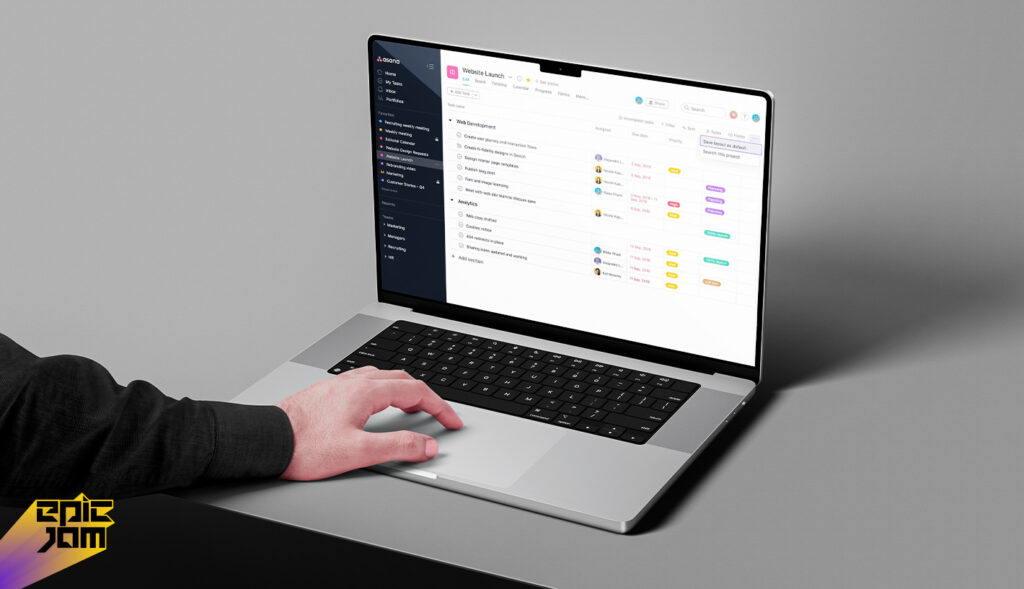
3. Project & Work Management: Asana
When clarity and collaboration on projects are paramount, Asana provides an intuitive platform to coordinate work across teams.
- Ideal For: Teams of all sizes that need to plan, track, and manage projects and daily work without overly complex systems. It’s excellent for marketing teams, product launches, and cross-functional projects.
- Key Strengths: Offers a user-friendly interface with multiple viewing options (list, board, timeline). It excels at task creation, assignment, and progress tracking, with built-in communication tools to keep collaboration focused.
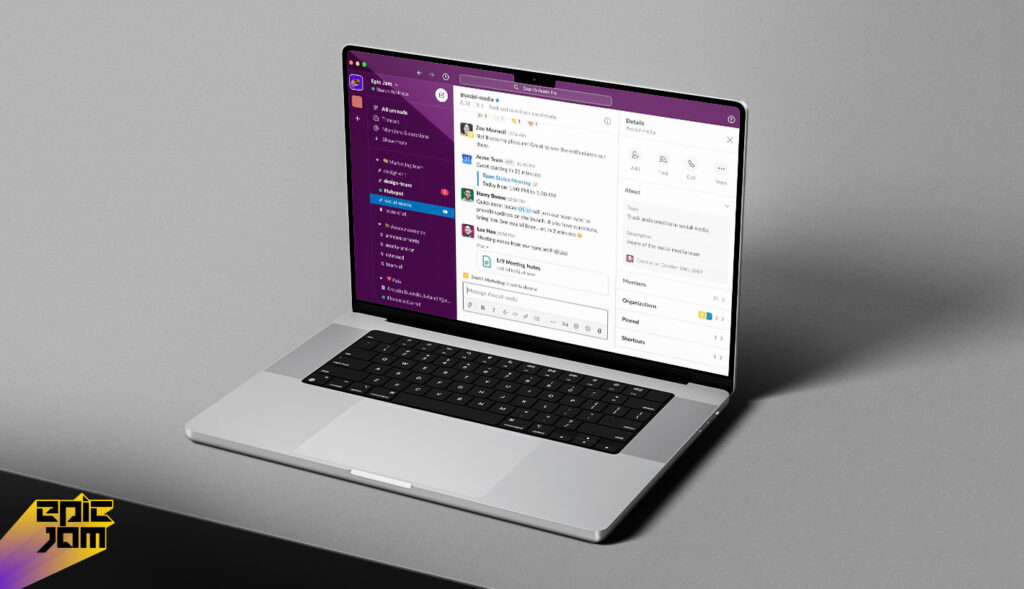
4. Communication & Collaboration: Slack
For reducing email overload and enabling real-time communication, Slack has become the central hub for team interaction.
- Ideal For: Any organization, especially those with remote or hybrid teams, that needs to streamline communication through organized channels for projects, topics, or departments.
- Key Strengths: Its channel-based messaging keeps discussions organized and searchable. It integrates with almost every other tool (like Google Drive, Salesforce, and Asana), bringing notifications and workflows into one place.
5. Human Resources & Recruitment: Greenhouse
To transform your hiring from a chaotic process into a strategic advantage, Greenhouse offers a powerful applicant tracking system (ATS) and hiring suite.
- Ideal For: Companies that prioritize structured, fair, and data-driven hiring to attract and secure top talent.
- Key Strengths: Goes beyond basic application tracking to optimize the entire recruitment funnel with scorecards, structured interviews, and robust reporting that helps improve hiring quality and reduce bias.
6. Cloud Infrastructure & Services: Amazon Web Services (AWS)
When your business needs reliable, scalable, and secure computing power, storage, and databases without building physical servers, AWS is the leading cloud platform.
- Ideal For: Developers and companies of all sizes building anything from simple websites to complex, global enterprise applications that require flexible infrastructure.
- Key Strengths: Offers an unparalleled breadth and depth of over 200 cloud services. Its pay-as-you-go model is cost-effective, and its global network of data centers ensures performance and reliability.
7. Accounting & Financial Management: QuickBooks Enterprise
For SMBs that have outgrown basic accounting software but aren’t ready for a full-scale ERP, QuickBooks Enterprise is a robust financial management solution.
- Ideal For: Small to medium-sized businesses with complex inventory, advanced reporting needs, or multiple users that need more power than QuickBooks Online or Pro.
- Key Strengths: Provides powerful inventory management with advanced tracking, role-based user permissions, and in-depth, customizable reporting tailored for deeper business insights.
8. Customer Support & Service: Zendesk
To deliver efficient and personalized customer service across multiple channels, Zendesk provides a unified suite of support tools.
- Ideal For: Businesses that want to manage customer inquiries from email, chat, social media, and phone in one place, ensuring no request falls through the cracks.
- Key Strengths: Features a unified agent workspace, integrated AI for automated answers and insights, and robust analytics to track support team performance and customer satisfaction.
9. Application Development & Integration: Epic Jam
For companies that have outgrown off-the-shelf software and need tailored solutions to solve unique business challenges or create a competitive advantage, custom application development platforms are key. Solutions in this space help businesses build, deploy, and integrate bespoke software.
- Ideal For: Medium to large enterprises with specific process gaps, unique operational needs, or a desire to build proprietary tools that differentiate them in the market.
- Key Strengths: (Note: As a named brand, strengths would be based on its actual services, such as low-code development, rapid prototyping, custom integration capabilities, or specific industry expertise.)

10. All-in-One Work OS: Monday
For teams that want a highly flexible and visual system to manage everything from projects and sales pipelines to strategic planning, monday.com acts as a customizable work operating system.
- Ideal For: Teams that value visual project tracking (using boards, timelines, charts) and need a platform they can customize to fit unique workflows without complex coding.
- Key Strengths: Extreme flexibility with countless templates, strong automation features to connect steps in a workflow, and powerful visualizations to see project status at a glance.
Your Roadmap to Selection and Implementation
Finding the right tool is half the battle. A successful rollout is what delivers the ROI. Here’s a simple, four-step framework to guide you:
- Define Your Core Problem and Goals: Start by asking, “What specific process are we trying to improve?” and “How will we measure success?” Avoid shopping for features; instead, focus on the business outcome.
- Map Requirements and Involve Users: List your must-have and nice-to-have features. Critically, involve the employees who will use the software daily in the evaluation process. Their buy-in is crucial for adoption.
- Evaluate for Integration and Scalability: The best software plays well with others. Check its API and integration capabilities with your existing tools (like your CRM or accounting software). Also, ask: “Can this solution grow with us over the next 3-5 years?”
- Plan for Phased Adoption and Training: Resist the “big bang” launch. Start with a pilot group or roll out core features first. Invest in proper training and ongoing support to ensure your team feels confident and can use the software to its full potential.
| Enterprise Software Category | Description | Example Tools / Software |
|---|---|---|
| 1. Enterprise Resource Planning (ERP) | Integrated systems that manage core business functions (finance, HR, supply chain, operations) from a unified platform. | SAP S/4HANA, Oracle NetSuite, Microsoft Dynamics 365 |
| 2. Customer Relationship Management (CRM) | Software for managing customer interactions, sales pipelines, and marketing automation to boost customer engagement and retention. | Salesforce, HubSpot CRM, Zoho CRM |
| 3. Business Intelligence (BI) & Analytics | Platforms that analyze, visualize, and report on business data to help leaders make informed decisions. | Tableau, Microsoft Power BI, Qlik Sense |
| 4. Human Resource Management Systems (HRMS) | Software that automates HR processes like payroll, recruitment, and performance management. | Workday, BambooHR, ADP Workforce Now |
| 5. Supply Chain Management (SCM) | Tools to manage logistics, inventory, and supplier coordination across the supply chain. | Oracle SCM Cloud, SAP SCM, Infor SCM |
| 6. Marketing Automation | Platforms that automate digital marketing activities, campaigns, and lead nurturing. | HubSpot Marketing Hub, Marketo, Mailchimp |
| 7. Content Management Systems (CMS) | Systems to create, manage, and publish digital content easily without coding skills. | WordPress, Adobe Experience Manager, Joomla |
| 8. Collaboration & Communication Tools | Software that supports team communication, file sharing, and project collaboration. | Slack, Microsoft Teams, Zoom |
| 9. E-commerce Platforms | Enterprise e-commerce tools to manage online storefronts, product catalogs, and transactions. | Shopify Plus, Magento, BigCommerce |
| 10. IT Service Management & Security | Platforms to handle enterprise IT operations, incident management, and cybersecurity functions. | ServiceNow, IBM QRadar, Splunk Enterprise Security |
Conclusion: Building Your Foundation for the Future
Selecting enterprise software is a strategic investment that shapes your company’s agility, efficiency, and capacity for innovation. The “best” software isn’t the one with the most features; it’s the one that best fits your unique processes, integrates smoothly into your environment, and scales to support your future growth.
By focusing on your core operational needs—be it unified customer data with a CRM like Salesforce, integrated business management with an ERP like NetSuite, or seamless team collaboration with a platform like Asana—you build a connected technology ecosystem that drives real business value.
Frequently Asked Questions (FAQs)
Q1: What’s the typical cost range for enterprise software?
Costs vary dramatically. It can range from a few dollars per user per month for simpler tools to hundreds of thousands of dollars for a full-scale, custom ERP implementation. Most cloud-based solutions use a subscription (SaaS) model. Always consider the total cost of ownership, including implementation, training, and ongoing support.
Q2: How long does it take to implement enterprise software?
Timelines depend on complexity and scope. A department-level tool like a project management app can be live in weeks. A company-wide ERP system often requires a 6 to 18-month phased implementation plan. Starting with a Minimum Viable Product (MVP) approach—deploying core functions first—is a smart way to achieve value faster.
Q3: What’s the difference between ERP and CRM software?
A CRM (Customer Relationship Management) system manages all interactions with your customers and leads (sales, marketing, service). An ERP (Enterprise Resource Planning) system integrates and manages core internal business processes like finance, inventory, HR, and supply chain. They often work together, with the CRM feeding customer order data into the ERP for fulfillment.
Q4: Can small businesses benefit from this type of software?
Absolutely. While “enterprise” implies scale, the principles are the same. Many vendors offer versions tailored for SMBs. The key benefits of automation, integration, and data-driven insight are perhaps even more critical for smaller businesses that need to do more with less. The key is to choose solutions that fit your current size and budget while offering a clear path to scale.
Q5: How do we ensure our team will actually use the new software?
User adoption is critical. Secure it by:
- Involving key users in the selection process early,
- Choosing intuitive, user-friendly platforms,
- Investing in comprehensive, role-specific training, and
- Having leadership actively uses and champions the new system. Clear communication about the “why” behind the change is essential.

